[FEATURE REQUEST] Ability to tile windows automatically
### The "Window-Tiling" PowerToy Here's an idea, add the ability to tile windows automatically. What I mean by that is when a window would open, it'll cover the whole screen but when another window would open, it'll cover the half of the screen automatically and the first app would also resize to the half of the screen. If the third window opens it'll open below the second window, resizing the second window to half vertically. And the new window would take place under the second window. It has been done before in some Linux window managers like "i3". And a lot of people really appreciate the ability to do that. ### Concept Shots I've prepared some concept shots to show that:  In the image above, a single window is opened. When the user wants open another window, they would need to click the start button or hit the start key on the keyboard. The Start Menu would be replaced with Power Run. The user would be able to select the desired app by typing it's name and selecting one of the results by using the arrow keys. Or just type the name and hit enter  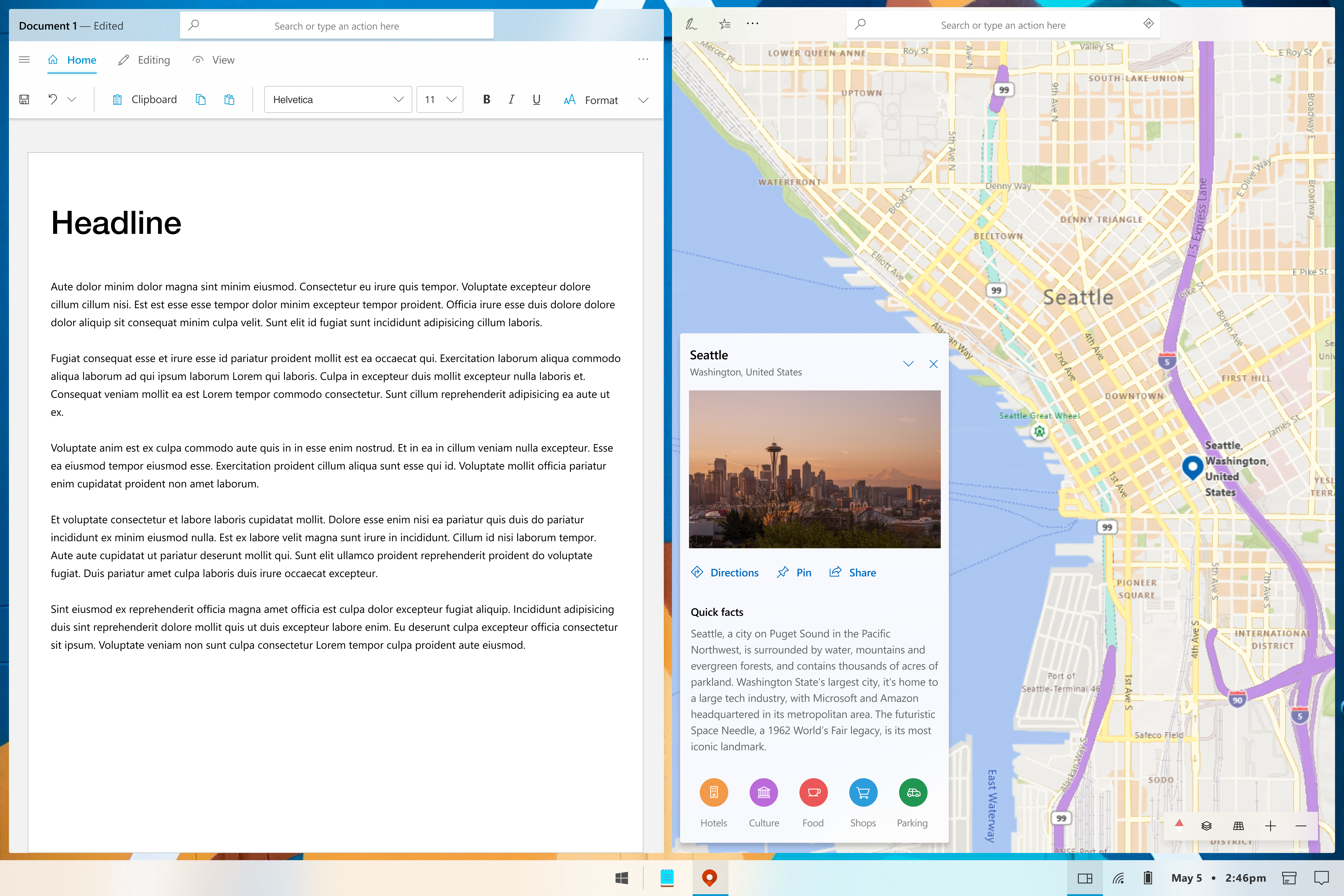 And when more than two apps are opened: ![Surface
Posted by zeealeid on May 5, 2020, 7:25 PM
Tags
Related issues
- 2026 - Microsoft Office 365
- [Ubuntu] `ubuntu-latest` label will use Ubuntu 26.04 in November 2026
- Gamut mapping
- [Codex Desktop] Editing and resending a queued message triggers "App-server queued follow-up no longer exists"
- [Windows] ChatGPT 26.820.60940 fails with "invalid transport in mcp_servers.codex_app"; Beta 26.727.40816 works
- [BUG]: infinite loading of videos
Raise real-world problems, find people facing the same issue, and discuss solutions.3,500 issues0 comments
github (SaaS)
2026 - Microsoft Office 365
[Ubuntu] `ubuntu-latest` label will use Ubuntu 26.04 in November 2026
Gamut mapping
[Codex Desktop] Editing and resending a queued message triggers "App-server queued follow-up no longer exists"
[Windows] ChatGPT 26.820.60940 fails with "invalid transport in mcp_servers.codex_app"; Beta 26.727.40816 works
[BUG]: infinite loading of videos
Restore GPT-5.6 Sol’s 372k Codex context window, or provide an opt-in setting
Codex Desktop for macOS repeatedly triggers `syspolicyd` / `trustd` CPU and memory runaway
[FEATURE REQUEST] Ability to tile windows automatically
### The "Window-Tiling" PowerToy Here's an idea, add the ability to tile windows automatically. What I mean by that is when a window would open, it'll cover the whole screen but when another window would open, it'll cover the half of the screen automatically and the first app would also resize to the half of the screen. If the third window opens it'll open below the second window, resizing the second window to half vertically. And the new window would take place under the second window. It has been done before in some Linux window managers like "i3". And a lot of people really appreciate the ability to do that. ### Concept Shots I've prepared some concept shots to show that:  In the image above, a single window is opened. When the user wants open another window, they would need to click the start button or hit the start key on the keyboard. The Start Menu would be replaced with Power Run. The user would be able to select the desired app by typing it's name and selecting one of the results by using the arrow keys. Or just type the name and hit enter   And when more than two apps are opened: ![Surface
Comments (0)
No comments yet. Start the discussion.